Separate resolution from aspect ratio
Resolution is the number of pixels across and down. 1920×1080 and 1280×720 have different pixel counts but share a 16:9 aspect ratio.
Aspect ratio describes the relationship between width and height. A 1:1 square cannot hold a complete 16:9 frame at full width without either empty space or cropping.
| Term | Meaning | Example |
|---|---|---|
| Resolution | Width × height in pixels | 1920×1080 |
| Aspect ratio | Width-to-height relationship | 16:9 |
| Resize | Change pixel dimensions | 1920×1080 → 1280×720 |
| Crop | Remove content outside a frame | Select a 1:1 area |
| Letterbox / Contain | Keep the full image and fill unused space | Landscape inside a square |
Three ways to put 16:9 into 1:1
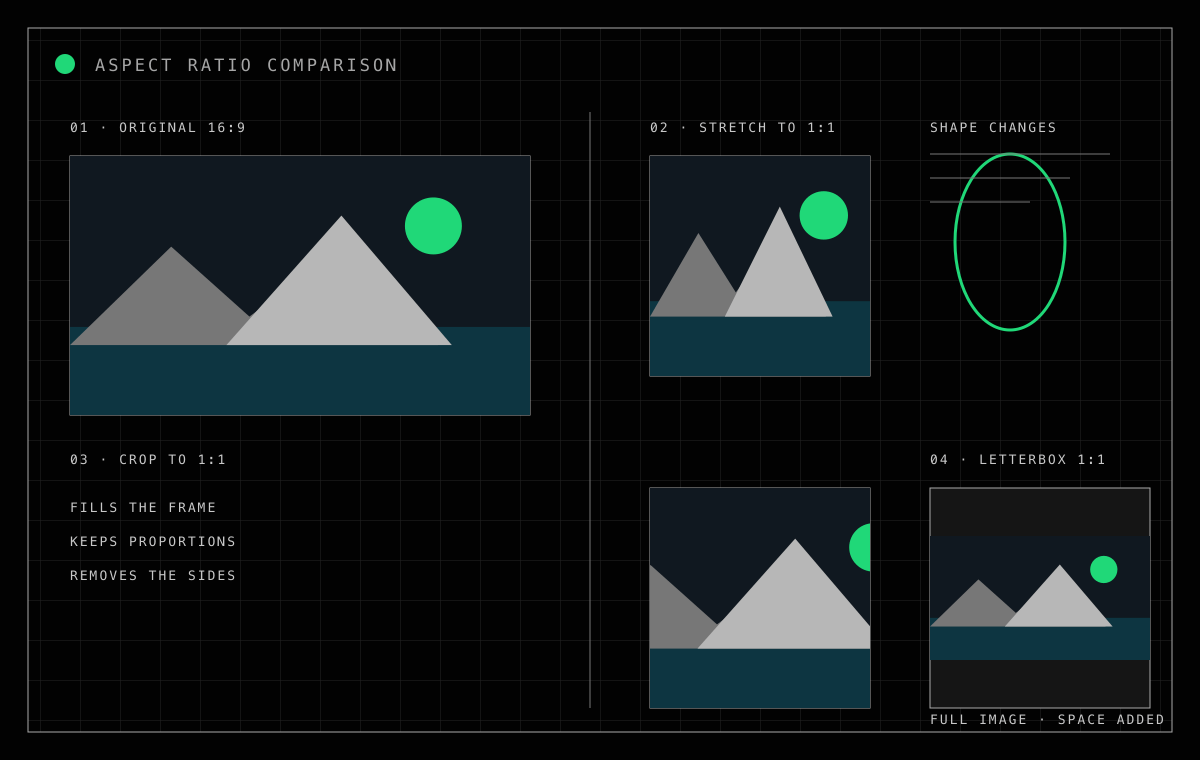
Stretch, Crop and Contain solve different problems. The comparison shows how the same mountain, sea and sun survive each treatment.
Stretch matches dimensions by changing shape
Forcing width and height independently keeps every source pixel represented but changes proportions. Circles can become ovals and people or products can look squeezed.
Unless distortion is acceptable, exact dimensions alone are not a successful result.
Crop fills the frame by giving up an edge
Crop preserves proportions and fills the target. Moving from 16:9 to 1:1 usually removes areas from the left and right.
Check the crop focus when a face, product or text matters. One shared focus across a batch may not suit every composition.
Contain and letterbox protect the full scene
Contain scales the entire source inside the destination. The unmatched area is filled with a background, commonly called letterboxing.
It suits documents, catalog images and frames with text that must not be cut, though the picture occupies less of the output.
Choose by consequence
| Situation | Consider | Reason |
|---|---|---|
| Square profile or thumbnail | Crop | Fills the frame |
| Logo, document or full product | Contain | Nothing is removed |
| Abstract texture | Stretch, if acceptable | Verify distortion is harmless |
| Phone wallpaper | Crop or Contain | Depends on subject and space |
| Video thumbnail | Crop | Protect text and faces |
Compare the modes in Only My Kit
Exact image resizing offers Crop, Fit and Stretch. Crop includes a 3×3 focus control; Fit lets you choose the background color.
Crop & Transform offers 1:1, 4:3, 16:9, 3:4 and 9:16 crops plus focus, rotation and flipping. Resize can also avoid enlarging smaller sources.
FAQ
- Are resize and crop the same?
- No. Resize changes pixel dimensions; crop removes pixels outside a selected frame.
- Can I make a square without cropping?
- Yes, with Contain or Letterbox, but unused space appears on two sides.
- When is Stretch acceptable?
- It can suit abstract patterns or a deliberate effect, but is usually wrong for people, logos and products.