Why we choose 100% local processing over server uploads
Many web tools upload user files to remote servers simply because server-side processing is easier to implement. From a privacy perspective, keeping files strictly on your local device is the safest and most reliable approach.
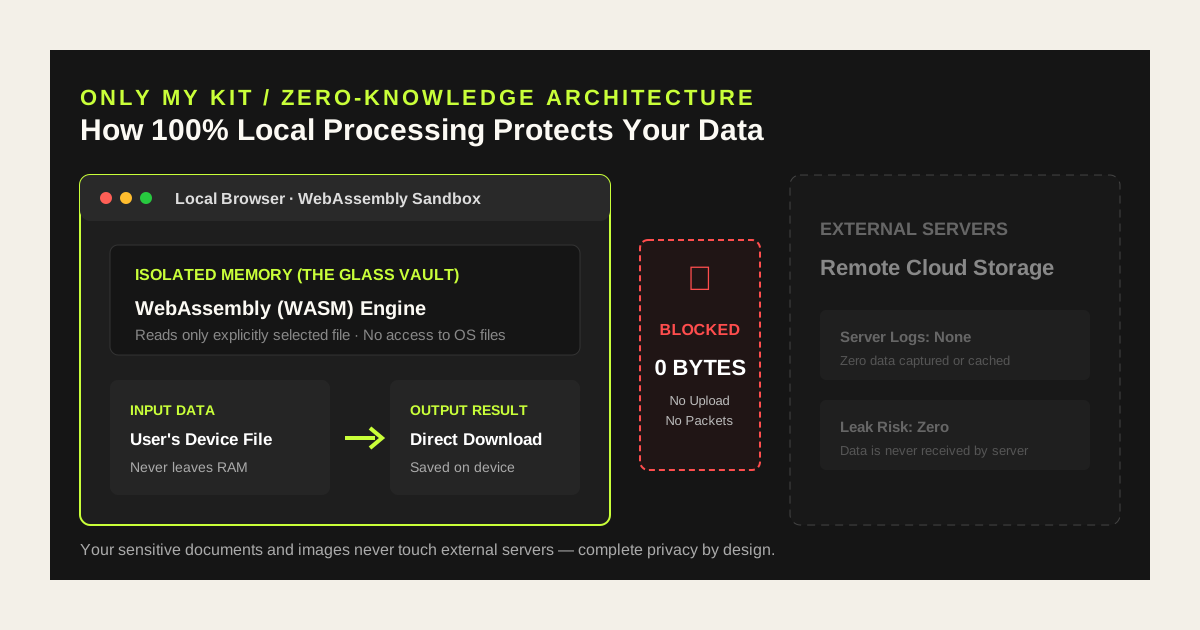
Only My Kit fundamentally eliminates privacy risks by eliminating file upload mechanisms entirely.
- Zero upload trace: No transmission packets or cloud logs store your files.
- Leak-proof architecture: Without server data ingestion, server vulnerabilities or breaches cannot compromise your files.
- Complete user control: Data resides strictly in your computer or mobile RAM and is purged immediately upon closing.
WebAssembly (WASM): The high-speed calculator in a 'glass vault'
To perform intensive tasks like high-resolution image compression, video processing, and PDF manipulation directly in the browser, Only My Kit leverages modern WebAssembly (WASM) technology.
WASM runs high-performance native engines inside your browser, acting like an impenetrable 'transparent glass vault'. It executes calculations at near-native speeds while the browser sandbox prevents it from touching your hard drive or system files.
Can running local code harm my computer?
It is natural to wonder whether running code locally exposes your computer to malware. Thanks to strict browser security models, unauthorized system access is mathematically and architecturally prohibited.
WASM runs within the strict browser sandbox. It can only read the exact file bytes you explicitly selected, and has zero permissions to browse directories, write to disk, or execute system commands.
- Browser sandbox barrier: Strict security isolation between the web and your OS
- Exclusive single-file access: Only the user-selected file can be processed
- Zero system command authority: Exploits and unauthorized disk access are blocked by design
Comparing server uploads vs. Only My Kit local processing
A side-by-side comparison highlights the privacy benefits of local WebAssembly processing over traditional server-based web tools.
| Aspect | Traditional Server Upload | Only My Kit (Local WASM) |
|---|---|---|
| Data Pathway | Device → Internet → Remote Server | Device RAM → Browser engine only |
| Outbound Traffic | Full file size (megabytes to gigabytes) | 0 bytes (zero upload packets) |
| Server Storage Risk | Dependent on server cache & deletion policy | Zero risk; data never reaches server |
| Offline Capable | Requires active internet connection | Runs offline after initial page load |
| Verification | Requires trusting company privacy promises | Verifiable in Browser DevTools (F12) |
Verify the zero-byte upload yourself in DevTools
Only My Kit does not ask for blind trust. You can inspect all network communications yourself using built-in browser developer tools.
- Press F12 (or Cmd + Option + I on macOS) to open Developer Tools.
- Switch to the Network tab.
- Add an image, PDF, or video to any Only My Kit tool and run the process.
- Observe that zero large POST/PUT requests transfer file bytes to external servers.
A safe environment for sensitive documents and files
Local processing is especially crucial when handling sensitive documents where data exposure is unacceptable.
- Redacting IDs, passports, and personal certificates
- Merging financial statements, legal contracts, and tax returns
- Stripping GPS metadata and EXIF location tags from private photos
- Formatting JSON containing internal secrets or configuration keys
Privacy best practices checklist
- Always check if a converter uploads files before processing sensitive data.
- Remove GPS EXIF metadata before sharing personal photos online.
- WASM tools continue to work even in Airplane mode once loaded.
- Closing your browser tab immediately releases all allocated memory.
FAQ
- Does any file trace remain in memory after conversion?
- Converted files reside in temporary browser Blob memory. Once you close the tab or refresh the page, browser garbage collection cleanly clears all traces from RAM.
- Can I use the tools without an active internet connection?
- Yes. Once the page is loaded, you can disconnect your Wi-Fi or enable Airplane mode, and conversions will proceed normally. This proves no server communication takes place.
- Does local processing depend on computer performance?
- Because calculations utilize your local CPU, processing very large videos or files may take slightly longer on older hardware. This is a worthwhile trade-off for total privacy.