How do I open a JSON file?
A .json file is plain text rather than a document locked to one app. A text editor can open it, but a single long line or deeply nested data is hard to scan.
Paste the contents into a JSON viewer or choose the file to format it. For workplace data, check for sensitive fields first.
What is JSON?
It is a rule-based text format that programs use to exchange named values. A spreadsheet row with Name Kim and Age 32 can be represented as {"name":"Kim","age":32}.
| Spreadsheet column | JSON name and value |
|---|---|
| Name | "name": "Kim" |
| Age | "age": 32 |
Reading {}, [] and key: value
- { } groups related names and values in an object.
- In "name": "Kim", name is the key and Kim is the value.
- [ ] is an array containing several items, such as orders.
- Values may also be numbers, true or false, null, objects or arrays.
Why does JSON look difficult?
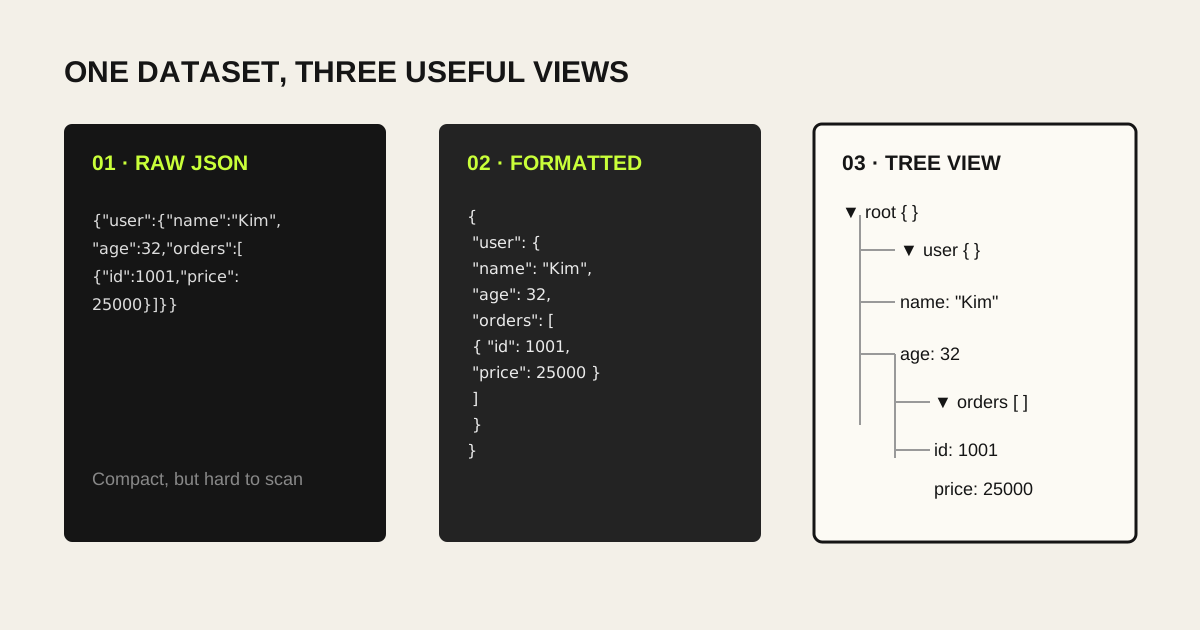
Line breaks are optional, so APIs often return compact JSON. A formatter adds indentation; a tree viewer turns nested objects and arrays into branches that can be expanded and collapsed.
Raw and formatted JSON
{"user":{"name":"Kim","age":32,"orders":[{"id":1001,"price":25000}]}}{
"user": {
"name": "Kim",
"age": 32,
"orders": [{ "id": 1001, "price": 25000 }]
}
}
Follow the path to the value you need
Start with a large group such as user, then inspect name or userId. If orders is an array, expand each item to find id and price.
- user → name: user name
- user → userId: identifier
- orders → item → id: order number
- orders → item → price: amount
- status or success: API result
- Item count beside [ ]: array length
Use the Only My Kit JSON tools
The available tools are JSON Formatter, Tree Viewer, Validator and Minifier. You can choose a .json file or paste text. Formatted output can be copied or saved as a JSON file; Tree View focuses on expandable exploration.
Parsing, formatting, tree construction and download creation run in your browser. The input JSON is not sent to a server.
- Choose a JSON file or paste its contents.
- Use Formatter for layout or Tree for hierarchy.
- Use Validator to locate a syntax error by line and column.
- Copy or download the result when available.
Check personal and company data first
JSON can contain names, email addresses, user IDs, orders, API keys, tokens and internal system details. Formatting does not hide any of them.
Only My Kit processes locally, but check the upload and retention policy before using another online viewer. Remove live keys and tokens whenever possible.
FAQ
- Can Excel open a JSON file?
- It can import JSON, but nested objects and arrays may not fit one flat sheet. Inspecting the tree first is often easier.
- Does formatting change the data?
- It changes whitespace and indentation while preserving the values and structure of valid JSON.